> ## Documentation Index
> Fetch the complete documentation index at: https://iso-topology.mintlify.site/llms.txt
> Use this file to discover all available pages before exploring further.
# Architecture, with another dimension.
> Build isometric architecture diagrams from text. Refine them in Studio. Keep the source alongside your code.
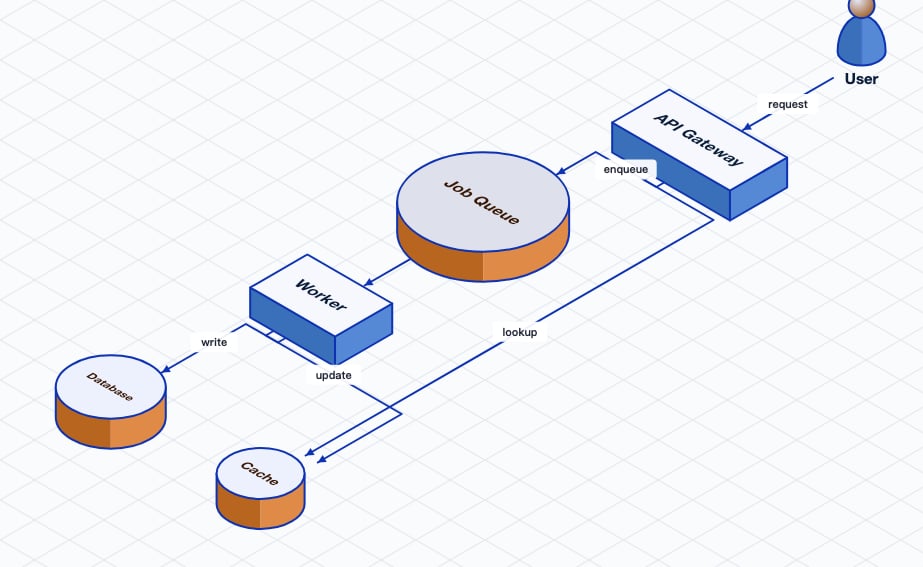 iso-topology is an open-source Go CLI and library for **2.5D isometric diagrams**.
Describe nodes and connections in D2, or compose a scene in YAML or JSON. The
renderer produces SVG you can use in documentation, design reviews, and READMEs.
Install one Go binary and turn a few lines of D2 into an SVG.
Browse real scenes and open the source behind each one.
## From source to diagram
Use D2 for automatic graph layout. Use YAML for explicit groups, replicas,
annotations, geometry, and styling.
Generate an SVG with the CLI. Open Studio to edit the source and adjust the
diagram visually. Validate the result before sharing it.
Commit your diagram source with your project. Re-render it as the architecture
changes, or call the same renderer from your Go application.
## Choose your workflow
Edit source, move nodes, adjust connections, and export from a local browser
workbench.
Build grouped architectures with relative placement, icons, and reusable styles.
Parse, validate, render, and edit diagrams through the library API.
Discover capabilities, validate sources, evaluate layouts, and render through MCP.
SVG rendering runs locally. PNG and PDF export need an additional rasterizer;
see the [publishing guide](/getting-started/05-publishing).
This documentation is built and hosted on [Mintlify](https://mintlify.com), a developer documentation platform.
iso-topology is an open-source Go CLI and library for **2.5D isometric diagrams**.
Describe nodes and connections in D2, or compose a scene in YAML or JSON. The
renderer produces SVG you can use in documentation, design reviews, and READMEs.
Install one Go binary and turn a few lines of D2 into an SVG.
Browse real scenes and open the source behind each one.
## From source to diagram
Use D2 for automatic graph layout. Use YAML for explicit groups, replicas,
annotations, geometry, and styling.
Generate an SVG with the CLI. Open Studio to edit the source and adjust the
diagram visually. Validate the result before sharing it.
Commit your diagram source with your project. Re-render it as the architecture
changes, or call the same renderer from your Go application.
## Choose your workflow
Edit source, move nodes, adjust connections, and export from a local browser
workbench.
Build grouped architectures with relative placement, icons, and reusable styles.
Parse, validate, render, and edit diagrams through the library API.
Discover capabilities, validate sources, evaluate layouts, and render through MCP.
SVG rendering runs locally. PNG and PDF export need an additional rasterizer;
see the [publishing guide](/getting-started/05-publishing).
This documentation is built and hosted on [Mintlify](https://mintlify.com), a developer documentation platform.