> ## Documentation Index
> Fetch the complete documentation index at: https://iso-topology.mintlify.site/llms.txt
> Use this file to discover all available pages before exploring further.
# Studio
> Edit diagrams in a local browser workbench with live source and canvas interactions.
Studio is the interactive page you get from `isotopo serve` (and, in a
degraded static form, from every `isotopo render` output as
`topology.html`). One file, one canvas, sub-second feedback: the YAML
on the right, the rendered isometric scene on the left, and a live
bidirectional mapping between them — now with direct manipulation
(drag to move, right-click to edit) on top.
```bash theme={null}
isotopo serve path/to/input.yaml # → http://localhost:8731
ISOTOPO_PORT=9000 isotopo serve … # pick a port
```
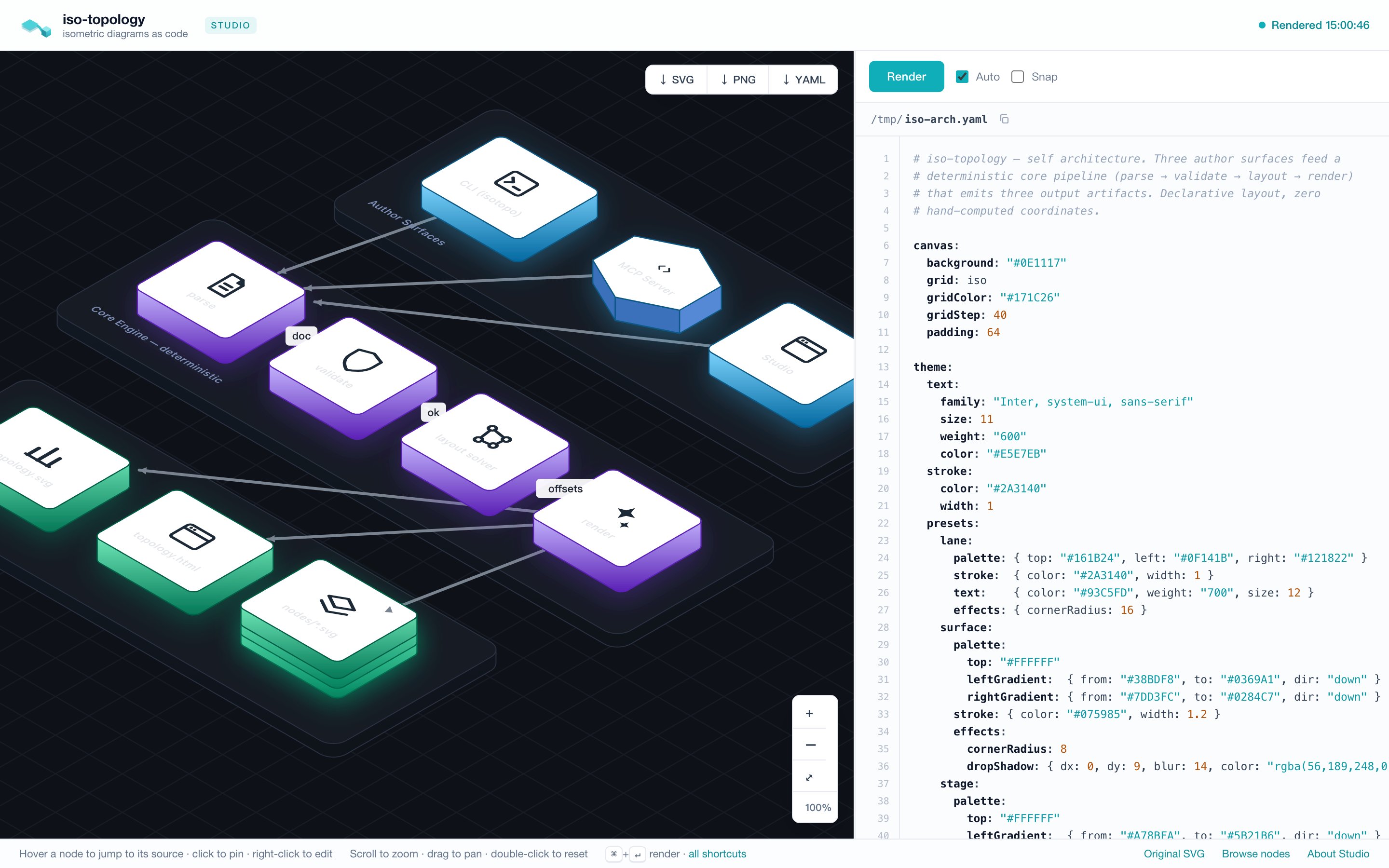 The canvas is on the left, the YAML editor on the right. Hover a node
to highlight its source; double-click (or right-click) to edit it; drag to move it.
Everything below is that surface in detail.
## Why it exists
iso-topology is agent-first: most diagrams here are *written by a
coding agent* against the DSL contract. But the loop only closes when
a human can look at the result, point at a node, and say "make this
one violet". Studio is that pointing device. It grew out of three
design positions:
1. **Accepted source is the persistent document.** In `serve` mode,
accepted edits auto-save to the bound local file; external file changes
reload in the editor. A segment-drag preview does not change the editor
source, disk file or undo history. Static `topology.html` keeps a local
draft and requires a running server for direct manipulation.
2. **Source and canvas are the same thing seen twice.** Hover a node
or edge → its YAML block highlights and scrolls into view. Click it
→ the highlight pins (click again, or the empty canvas, to unpin).
Put the caret inside a block → the node glows. Click a validation
error → the offending line flashes. If you can see it, you can find
it — in either direction.
3. **Local-first, zero cloud.** Studio is a single self-contained HTML
page served by the same static binary that renders your diagrams.
No accounts, no telemetry, no build step.
## Direct manipulation
Studio is not just a viewer — you can lay the diagram out and restyle
it by hand, drawio-style, and every gesture writes back to the YAML
(comment- and format-preserving) and re-renders.
### Move a node
Drag any node. The cursor reads `move` (4-way) on hover and `grabbing`
while dragging; connectors docked to that node **follow it live** so
the line never lags behind the gesture. On release the node lands
exactly under the cursor.
The **first** manual drag freezes the scene into explicit coordinates
and drops auto-layout — the drawio model. From then on the engine
never re-decides positions: every node sits where you put it, and you
own the layout. (Until that first drag, the diagram is whatever the
layout engine produced.)
### Connect specific ports
Hover a node to reveal its connection ports. Drag a port to another node;
the target ports appear and the preview snaps to the nearest one. Release
to create the connection. The selected displayed instance is retained,
including an upper stack replica, and one undo removes the new edge.
These gestures write explicit `port-left`, `port-back`, `port-right`, or
`port-front` references with `orthogonal2` routing. They work in isometric
and plan views; switching projection keeps the source reference. Fixed
ports use the body contour in isometric view and footprint sides in plan
view. Dashed port outlines mark the approximate array/rack envelope.
Text-only parts retain legacy anchor behavior. Existing authored face
anchors are not rewritten. Plan connection creation is supported; plan
segment dragging is still pending.
### Move an edge — one segment at a time
In isometric view, drag a visible segment or its circular handle. Horizontal
legs move along their perpendicular world axis; vertical risers move in the
XY plane. Heights and docked endpoints are preserved. Dragging an endpoint
leg retains a short lead at the port. The saved `waypoints3d` field records
absolute world coordinates, and subsequent edits preserve this 3-D intent.
The server computes the complete preview. Release commits that exact result
and creates one undo step; requests are coalesced so a late response cannot
replace a newer preview. Escape, switching projection, changing the source,
or losing window focus cancels the gesture. A failed request preserves the
source and both undo and redo histories. Preview requests do not save files;
the normal `serve` auto-save follows a successful commit.
A transparent hit corridor keeps thin lines easy to grab without changing
their visible width; it stays in the line’s painter layer. Handles appear
only on mapped, uncovered portions of the actual path.
Ambiguous projected overlaps are not independently editable. At a crossing or
an equally close pair of segments, move the pointer along the intended segment
until it is distinct; zooming in also helps separate close paths. Handles only
appear where their own midpoint identifies a unique visible segment. Clipped
away portions do not block editing the remaining path. A stale diagram
must be rendered before editing its segments. Curved/straight edges retain
bend editing, and plan segment dragging remains pending. Manual corners can
still route through a body; this gesture does not promise obstacle avoidance.
### Cursors & affordances
| Cursor / cue | Meaning |
| - | - |
| open hand (`grab`) | empty canvas — drag to pan |
| 4-way (`move`) + glow | over a movable node or edge |
| closed hand (`grabbing`) | a drag is in progress |
Toggle **Snap** in the toolbar to round dragged nodes to the grid (one
cell). Every structural edit — drag, detail edit, add/duplicate/delete —
is undoable with **⌘Z** / **⌘⇧Z** (when focus isn't in the editor).
## Right-click menu
Right-click an element for a context menu:
* **node** → Edit details · Duplicate (clone with a fresh id) · Delete
(also removes its connectors and frees any sibling `place:`d against it)
* **container** (a group/lane with nested parts) → Edit details only.
Duplicate/Delete are hidden: cloning would collide the children's ids,
and deleting would wipe the whole lane. Edit those in the YAML pane.
* **edge** → Edit details · Delete
* **empty canvas** → + Add node (a default rectangle) · Edit details
(the canvas background/grid)
The same guards hold server-side (`ApplyOp` refuses a container
duplicate/delete), so embedders get them too.
**Drag a node between groups.** Dropping a node onto a group's slab moves it
INTO that group; dropping it on the bare canvas moves it OUT to the scene root.
The re-home rewrites the DSL hierarchy and drops the node's old offset so the
new parent lays it out — an in-group nudge (same parent) is unaffected.
## Edit details
**Edit details** — double-click an element (or right-click → Edit
details) — opens a modal of its visually-relevant
properties. Change them, hit **Update**, and both the canvas and the
YAML update for that element only.
The form is **schema-driven**: each editable DSL key is declared once
with an English label, a one-line description, an input type, and the
raw dotted key (shown in muted monospace beside the label, so the
friendly field stays anchored to the source). Highlights:
* **Tabbed, master-detail layout** — fields are grouped and split into
tabs down the left rail; the selected tab's fields show on the right,
so you see one small group at a time instead of one long scroll. A
node's tabs read *Content* → *Size* → *Position* → *Layout*
(containers only) → *Fill* → *Gradients* → *Border* → *Label* →
*Effects*. Switching tabs **keeps unsaved edits** in the others —
**Update** writes every change across all tabs at once.
* **Shape-aware sections** — the colour groups depend on what the shape
can render: the box family gets *Fill — faces* (top/left/right) plus
per-face *Gradients*; a flat *text* node gets only its label; a
*boundary* gets its dashed border; containers (group/composite) gain a
*Layout — children* group (mode / gap / columns).
* **Empty fields show their effective value, not a bare blank** — an
unset field is hinted with what the canvas actually uses, so it never
reads as "missing". The verb tells you where the value comes from:
`inherits …` (a colour/size/weight from a preset or the theme),
`auto …` (a width/depth the layout solver computed for a container),
or `default …` (a connector's built-in routing/stroke). The editable
value stays empty, so an untouched field keeps deferring; type a value
to override. Fields that are genuinely *off* (no glow, no pattern,
opacity 1) stay blank with no hint — empty there means empty.
* **Icon color** — a tint picker for `iso://` glyph and logo icons
(the color lives in the ref suffix, e.g. `iso://glyph/cpu/7C3AED`;
the picker writes it for you, blank reverts to default ink). It is
a no-op for image-URL / local-file icons, which carry their own
colors.
* **Illustrated choices** — enums render as tiles with a glyph, not bare
words: node **shape** (cube / cylinder / circle / cloud / person /
hexprism / octprism / …), canvas **grid** (iso / dots / hatch / solid),
edge **arrowhead**, **routing** (orthogonal / straight / bezier), and
edge **line style** (solid / dashed / dotted).
* **Colors** get a native picker plus a free-text field (any CSS color).
* **Icon** takes an `iso://…` ref, an image URL, or a local file via
**Browse…** — the picked file is embedded as a data URI so it renders
on the canvas and exports standalone. A local file *path* in the YAML
is also inlined at render time.
Editing the canvas covers the whole image: **Fill color**, **Grid
pattern**, **Grid color**, **Grid step**, **Padding** (it creates the
`canvas:` block if your file doesn't have one yet).
## The rest of the surface
| Area | What it does |
| - | - |
| **Canvas** | Scroll to zoom, drag to pan, double-click resets, `⌘0` fits. The backdrop tints itself after `canvas.background`. Zoom controls bottom-right. |
| **Editor** | Syntax-highlighted YAML over a line-number gutter. Tab indents. Drag-resizable splitter (remembers its width). |
| **Render** | `Auto` re-renders (debounced) as you type; `⌘↵` forces it. A failed edit keeps the last good render with a "showing last good render" badge — the canvas never goes blank. |
| **View toggle** | **◳ Iso / ◰ Plan** — flip between the 2.5D isometric view and a flat top-down **plan view** (footprints + orthogonal edges) to read the layout/flow. Preview-only: it sends `?projection=top` on the render round-trip and never rewrites your source. (Persist it with `canvas.projection: top`.) |
| **Status** | One indicator, top-right: `Rendered HH:MM:SS` (green) stamps the last successful render so you can see how current the canvas is; `Render failed` (red) when the source has errors; `Offline` when the renderer is unreachable (re-checked every 5 s, so it re-enables itself when `isotopo serve` is back). |
| **Issues** | Validation problems under the editor with did-you-mean suggestions. Click one to jump to (and flash) the line. |
| **Export** | `↓ SVG` / `↓ PNG` (2×) / `↓ YAML` — capture exactly what the canvas shows (unsaved edits included). |
| **Browse nodes** | Per-part gallery — every node as a standalone SVG/YAML fragment, served live from the current file. |
Keyboard map lives behind `?` (or the "all shortcuts" footer link).
## Static degradation
`isotopo render out/` writes the same page as `out/topology.html`.
Opened as a file it keeps everything except live operations — the
status reads "Static file" and Render/move/edit are disabled until you
point `isotopo serve` at the source. Exports still work.
## Endpoints (for tooling)
| Route | Meaning |
| - | - |
| `GET /` | Studio, freshly rendered from the file on disk |
| `GET /topology.svg` | current render of the file on disk |
| `GET /nodes/_index.html`, `/nodes/.svg\|.yaml\|.html` | per-part gallery |
| `POST /api/render?format=yaml` | render the posted source; returns `{"svg","issues","model","routes","screenLabels"}` |
| `POST /api/move?kind=node\|edge&…` | text-edit a node offset / edge route in the posted source; add `segment=` for a 3-D segment delta; returns `{"yaml","svg","issues","model","routes","screenLabels"}` |
| `POST /api/fields?kind=node\|edge\|canvas&…` | the detail-editor schema for an element, with current values |
| `POST /api/edit?kind=…&f=` | apply detail-editor changes to the posted source; returns `{"yaml","svg","issues","model","routes","screenLabels"}` |
| `POST /api/op?op=add\|delete\|duplicate\|reparent&kind=node\|edge&…` | structural ops (add / delete / duplicate; `reparent&id=&target=` moves a node into a group or to root); returns `{"yaml","svg","issues","model","routes","screenLabels"}` |
| `GET /api/ping` | health |
`screenLabels` comes from the same emission as `svg`; its record fields follow
the [emitted scene contract](../reference/api.md#consume-the-emitted-scene).
Studio uses the recorded pointer rectangles for bound-font label selection,
applying each group's current screen transform so zoom, pan and live drag
remain aligned. It caches the identity mapping per committed SVG. Unknown
fonts, older servers and mismatched records retain the browser geometry
fallback. An empty array means that this render has no isometric screen-label
layer; switching projection clears prior records.
The edit endpoints listed above do comment-preserving text surgery on the YAML
you POST and leave the file on disk untouched. They are a thin HTTP layer over
the stateless Go edit contract (`ApplyOp` / `EditOp` / `RenderSource`):
an embedder building a non-HTTP UI (desktop, WASM) can call those
directly instead of re-serializing JSON — see the **[API reference](../reference/api.md#direct-manipulation-editing-for-embedders)**.
Studio separately uses `POST /api/save` to persist its current source, including
automatic saving after a successful UI edit. Calling a render/edit endpoint
alone does not invoke that save path.
## How it's built
The page is assembled at compile time from three embedded assets, so
the binary stays single-file while the front-end is ordinary, lintable
code:
```
studio/studio.html page shell ({{CSS}}/{{JS}} + data placeholders)
studio/studio.css all styles
studio/studio.js all behaviour (zoom/pan, render, code mapping,
drag-to-edit, detail editor, context menu)
output.go //go:embed + a two-pass replacer → the final page
```
## How it's tested
`tools/viewer-test/cdp_test.py` drives headless Chrome over CDP and
asserts the surface end-to-end. Run it whenever the `studio/` assets or
the serve handlers change:
```bash theme={null}
python3 tools/viewer-test/cdp_test.py
```
This documentation is built and hosted on [Mintlify](https://mintlify.com), a developer documentation platform.
The canvas is on the left, the YAML editor on the right. Hover a node
to highlight its source; double-click (or right-click) to edit it; drag to move it.
Everything below is that surface in detail.
## Why it exists
iso-topology is agent-first: most diagrams here are *written by a
coding agent* against the DSL contract. But the loop only closes when
a human can look at the result, point at a node, and say "make this
one violet". Studio is that pointing device. It grew out of three
design positions:
1. **Accepted source is the persistent document.** In `serve` mode,
accepted edits auto-save to the bound local file; external file changes
reload in the editor. A segment-drag preview does not change the editor
source, disk file or undo history. Static `topology.html` keeps a local
draft and requires a running server for direct manipulation.
2. **Source and canvas are the same thing seen twice.** Hover a node
or edge → its YAML block highlights and scrolls into view. Click it
→ the highlight pins (click again, or the empty canvas, to unpin).
Put the caret inside a block → the node glows. Click a validation
error → the offending line flashes. If you can see it, you can find
it — in either direction.
3. **Local-first, zero cloud.** Studio is a single self-contained HTML
page served by the same static binary that renders your diagrams.
No accounts, no telemetry, no build step.
## Direct manipulation
Studio is not just a viewer — you can lay the diagram out and restyle
it by hand, drawio-style, and every gesture writes back to the YAML
(comment- and format-preserving) and re-renders.
### Move a node
Drag any node. The cursor reads `move` (4-way) on hover and `grabbing`
while dragging; connectors docked to that node **follow it live** so
the line never lags behind the gesture. On release the node lands
exactly under the cursor.
The **first** manual drag freezes the scene into explicit coordinates
and drops auto-layout — the drawio model. From then on the engine
never re-decides positions: every node sits where you put it, and you
own the layout. (Until that first drag, the diagram is whatever the
layout engine produced.)
### Connect specific ports
Hover a node to reveal its connection ports. Drag a port to another node;
the target ports appear and the preview snaps to the nearest one. Release
to create the connection. The selected displayed instance is retained,
including an upper stack replica, and one undo removes the new edge.
These gestures write explicit `port-left`, `port-back`, `port-right`, or
`port-front` references with `orthogonal2` routing. They work in isometric
and plan views; switching projection keeps the source reference. Fixed
ports use the body contour in isometric view and footprint sides in plan
view. Dashed port outlines mark the approximate array/rack envelope.
Text-only parts retain legacy anchor behavior. Existing authored face
anchors are not rewritten. Plan connection creation is supported; plan
segment dragging is still pending.
### Move an edge — one segment at a time
In isometric view, drag a visible segment or its circular handle. Horizontal
legs move along their perpendicular world axis; vertical risers move in the
XY plane. Heights and docked endpoints are preserved. Dragging an endpoint
leg retains a short lead at the port. The saved `waypoints3d` field records
absolute world coordinates, and subsequent edits preserve this 3-D intent.
The server computes the complete preview. Release commits that exact result
and creates one undo step; requests are coalesced so a late response cannot
replace a newer preview. Escape, switching projection, changing the source,
or losing window focus cancels the gesture. A failed request preserves the
source and both undo and redo histories. Preview requests do not save files;
the normal `serve` auto-save follows a successful commit.
A transparent hit corridor keeps thin lines easy to grab without changing
their visible width; it stays in the line’s painter layer. Handles appear
only on mapped, uncovered portions of the actual path.
Ambiguous projected overlaps are not independently editable. At a crossing or
an equally close pair of segments, move the pointer along the intended segment
until it is distinct; zooming in also helps separate close paths. Handles only
appear where their own midpoint identifies a unique visible segment. Clipped
away portions do not block editing the remaining path. A stale diagram
must be rendered before editing its segments. Curved/straight edges retain
bend editing, and plan segment dragging remains pending. Manual corners can
still route through a body; this gesture does not promise obstacle avoidance.
### Cursors & affordances
| Cursor / cue | Meaning |
| - | - |
| open hand (`grab`) | empty canvas — drag to pan |
| 4-way (`move`) + glow | over a movable node or edge |
| closed hand (`grabbing`) | a drag is in progress |
Toggle **Snap** in the toolbar to round dragged nodes to the grid (one
cell). Every structural edit — drag, detail edit, add/duplicate/delete —
is undoable with **⌘Z** / **⌘⇧Z** (when focus isn't in the editor).
## Right-click menu
Right-click an element for a context menu:
* **node** → Edit details · Duplicate (clone with a fresh id) · Delete
(also removes its connectors and frees any sibling `place:`d against it)
* **container** (a group/lane with nested parts) → Edit details only.
Duplicate/Delete are hidden: cloning would collide the children's ids,
and deleting would wipe the whole lane. Edit those in the YAML pane.
* **edge** → Edit details · Delete
* **empty canvas** → + Add node (a default rectangle) · Edit details
(the canvas background/grid)
The same guards hold server-side (`ApplyOp` refuses a container
duplicate/delete), so embedders get them too.
**Drag a node between groups.** Dropping a node onto a group's slab moves it
INTO that group; dropping it on the bare canvas moves it OUT to the scene root.
The re-home rewrites the DSL hierarchy and drops the node's old offset so the
new parent lays it out — an in-group nudge (same parent) is unaffected.
## Edit details
**Edit details** — double-click an element (or right-click → Edit
details) — opens a modal of its visually-relevant
properties. Change them, hit **Update**, and both the canvas and the
YAML update for that element only.
The form is **schema-driven**: each editable DSL key is declared once
with an English label, a one-line description, an input type, and the
raw dotted key (shown in muted monospace beside the label, so the
friendly field stays anchored to the source). Highlights:
* **Tabbed, master-detail layout** — fields are grouped and split into
tabs down the left rail; the selected tab's fields show on the right,
so you see one small group at a time instead of one long scroll. A
node's tabs read *Content* → *Size* → *Position* → *Layout*
(containers only) → *Fill* → *Gradients* → *Border* → *Label* →
*Effects*. Switching tabs **keeps unsaved edits** in the others —
**Update** writes every change across all tabs at once.
* **Shape-aware sections** — the colour groups depend on what the shape
can render: the box family gets *Fill — faces* (top/left/right) plus
per-face *Gradients*; a flat *text* node gets only its label; a
*boundary* gets its dashed border; containers (group/composite) gain a
*Layout — children* group (mode / gap / columns).
* **Empty fields show their effective value, not a bare blank** — an
unset field is hinted with what the canvas actually uses, so it never
reads as "missing". The verb tells you where the value comes from:
`inherits …` (a colour/size/weight from a preset or the theme),
`auto …` (a width/depth the layout solver computed for a container),
or `default …` (a connector's built-in routing/stroke). The editable
value stays empty, so an untouched field keeps deferring; type a value
to override. Fields that are genuinely *off* (no glow, no pattern,
opacity 1) stay blank with no hint — empty there means empty.
* **Icon color** — a tint picker for `iso://` glyph and logo icons
(the color lives in the ref suffix, e.g. `iso://glyph/cpu/7C3AED`;
the picker writes it for you, blank reverts to default ink). It is
a no-op for image-URL / local-file icons, which carry their own
colors.
* **Illustrated choices** — enums render as tiles with a glyph, not bare
words: node **shape** (cube / cylinder / circle / cloud / person /
hexprism / octprism / …), canvas **grid** (iso / dots / hatch / solid),
edge **arrowhead**, **routing** (orthogonal / straight / bezier), and
edge **line style** (solid / dashed / dotted).
* **Colors** get a native picker plus a free-text field (any CSS color).
* **Icon** takes an `iso://…` ref, an image URL, or a local file via
**Browse…** — the picked file is embedded as a data URI so it renders
on the canvas and exports standalone. A local file *path* in the YAML
is also inlined at render time.
Editing the canvas covers the whole image: **Fill color**, **Grid
pattern**, **Grid color**, **Grid step**, **Padding** (it creates the
`canvas:` block if your file doesn't have one yet).
## The rest of the surface
| Area | What it does |
| - | - |
| **Canvas** | Scroll to zoom, drag to pan, double-click resets, `⌘0` fits. The backdrop tints itself after `canvas.background`. Zoom controls bottom-right. |
| **Editor** | Syntax-highlighted YAML over a line-number gutter. Tab indents. Drag-resizable splitter (remembers its width). |
| **Render** | `Auto` re-renders (debounced) as you type; `⌘↵` forces it. A failed edit keeps the last good render with a "showing last good render" badge — the canvas never goes blank. |
| **View toggle** | **◳ Iso / ◰ Plan** — flip between the 2.5D isometric view and a flat top-down **plan view** (footprints + orthogonal edges) to read the layout/flow. Preview-only: it sends `?projection=top` on the render round-trip and never rewrites your source. (Persist it with `canvas.projection: top`.) |
| **Status** | One indicator, top-right: `Rendered HH:MM:SS` (green) stamps the last successful render so you can see how current the canvas is; `Render failed` (red) when the source has errors; `Offline` when the renderer is unreachable (re-checked every 5 s, so it re-enables itself when `isotopo serve` is back). |
| **Issues** | Validation problems under the editor with did-you-mean suggestions. Click one to jump to (and flash) the line. |
| **Export** | `↓ SVG` / `↓ PNG` (2×) / `↓ YAML` — capture exactly what the canvas shows (unsaved edits included). |
| **Browse nodes** | Per-part gallery — every node as a standalone SVG/YAML fragment, served live from the current file. |
Keyboard map lives behind `?` (or the "all shortcuts" footer link).
## Static degradation
`isotopo render out/` writes the same page as `out/topology.html`.
Opened as a file it keeps everything except live operations — the
status reads "Static file" and Render/move/edit are disabled until you
point `isotopo serve` at the source. Exports still work.
## Endpoints (for tooling)
| Route | Meaning |
| - | - |
| `GET /` | Studio, freshly rendered from the file on disk |
| `GET /topology.svg` | current render of the file on disk |
| `GET /nodes/_index.html`, `/nodes/.svg\|.yaml\|.html` | per-part gallery |
| `POST /api/render?format=yaml` | render the posted source; returns `{"svg","issues","model","routes","screenLabels"}` |
| `POST /api/move?kind=node\|edge&…` | text-edit a node offset / edge route in the posted source; add `segment=` for a 3-D segment delta; returns `{"yaml","svg","issues","model","routes","screenLabels"}` |
| `POST /api/fields?kind=node\|edge\|canvas&…` | the detail-editor schema for an element, with current values |
| `POST /api/edit?kind=…&f=` | apply detail-editor changes to the posted source; returns `{"yaml","svg","issues","model","routes","screenLabels"}` |
| `POST /api/op?op=add\|delete\|duplicate\|reparent&kind=node\|edge&…` | structural ops (add / delete / duplicate; `reparent&id=&target=` moves a node into a group or to root); returns `{"yaml","svg","issues","model","routes","screenLabels"}` |
| `GET /api/ping` | health |
`screenLabels` comes from the same emission as `svg`; its record fields follow
the [emitted scene contract](../reference/api.md#consume-the-emitted-scene).
Studio uses the recorded pointer rectangles for bound-font label selection,
applying each group's current screen transform so zoom, pan and live drag
remain aligned. It caches the identity mapping per committed SVG. Unknown
fonts, older servers and mismatched records retain the browser geometry
fallback. An empty array means that this render has no isometric screen-label
layer; switching projection clears prior records.
The edit endpoints listed above do comment-preserving text surgery on the YAML
you POST and leave the file on disk untouched. They are a thin HTTP layer over
the stateless Go edit contract (`ApplyOp` / `EditOp` / `RenderSource`):
an embedder building a non-HTTP UI (desktop, WASM) can call those
directly instead of re-serializing JSON — see the **[API reference](../reference/api.md#direct-manipulation-editing-for-embedders)**.
Studio separately uses `POST /api/save` to persist its current source, including
automatic saving after a successful UI edit. Calling a render/edit endpoint
alone does not invoke that save path.
## How it's built
The page is assembled at compile time from three embedded assets, so
the binary stays single-file while the front-end is ordinary, lintable
code:
```
studio/studio.html page shell ({{CSS}}/{{JS}} + data placeholders)
studio/studio.css all styles
studio/studio.js all behaviour (zoom/pan, render, code mapping,
drag-to-edit, detail editor, context menu)
output.go //go:embed + a two-pass replacer → the final page
```
## How it's tested
`tools/viewer-test/cdp_test.py` drives headless Chrome over CDP and
asserts the surface end-to-end. Run it whenever the `studio/` assets or
the serve handlers change:
```bash theme={null}
python3 tools/viewer-test/cdp_test.py
```
This documentation is built and hosted on [Mintlify](https://mintlify.com), a developer documentation platform.